A practical workflow to modernize legacy internal tools into secure MVP apps
Jamie
Start with evidence not assumptions
Modernizing internal tools often stalls because teams jump straight to rebuilding without a clear picture of what the legacy tool actually does, who uses it, and which risks it carries. A faster path is to treat the legacy UI as an authoritative spec, capture how people really work, then generate a first-pass MVP that is secure by default: role-based access control (RBAC), audit logs, and a deployment path that doesn’t require a bespoke platform project.
This workflow is designed for the common situation where the “spec” is a screenshot, a spreadsheet, and tribal knowledge. The goal is to get to a working, reviewable app quickly, while keeping engineering standards intact.
Step 1: Turn screenshots into a requirements map
Collect the core screens users rely on: list pages, forms, detail views, admin panels, exports, and any error states. For each screenshot, annotate three things:
- Entities (what data exists): e.g., Vendors, Purchase Orders, Tickets, Approvals.
- Actions (what users do): create, edit, approve, archive, export, reassign.
- Constraints (what must be true): required fields, uniqueness, status transitions, validations.
Then run a short “reality check” session with 2–3 power users and one stakeholder. Ask them to walk through their last real task end-to-end. This surfaces the hidden logic that screenshots don’t show: exceptions, workarounds, and who actually needs access.
Output you want
- A minimal list of screens required for the MVP
- A list of roles and responsibilities (even if rough)
- A shortlist of “must not break” workflows
Step 2: Define the MVP boundary with security built in
A secure MVP is not “add auth later.” It’s deciding, upfront, what data is sensitive and how access should work. Keep the MVP scope small, but do not cut:
- Authentication so you can attribute actions to real people.
- RBAC so the app can be safely shared beyond the original creators.
- Audit logging so you can answer “who changed what, when, and why.”
To keep this practical, use a simple policy model at first: define roles (e.g., Admin, Manager, Agent, Viewer) and map them to permissions per entity and action. Avoid overfitting to edge cases before you’ve shipped the first usable version.
Step 3: Model the data like a product not a spreadsheet
Legacy tools often store meaning in columns like “Status = Approved (manual)” or rely on free-form notes. For a modern app, you’ll move that meaning into explicit structure:
- Tables for core entities and join tables for many-to-many relationships.
- Enums or reference tables for statuses and categories.
- Created/updated timestamps on everything you care about.
- Foreign keys to enforce integrity.
Also define which records are tenant-scoped (per business unit or customer) and which are global. That decision influences RBAC and data residency needs later.
Step 4: Generate a working prototype and iterate in tight loops
Once the screens and data model are clear, you can produce a working prototype quickly and refine it with user feedback. Tools that accept screenshots and documents are useful here because they reduce translation loss between “what we have” and “what we’re building.”
Lovable fits this workflow well: you can start from screenshots, get a real-time prototype, and iterate conversationally while still ending up with production-ready code on a standard stack (React, Supabase, Tailwind) that your team owns. The key advantage is that the prototype doesn’t remain a throwaway mock—engineers can review changes, sync to GitHub, and keep building in a normal development process.
Iteration cadence that works
- Day 1: MVP screens + basic CRUD flows
- Day 2: Permissions pass + error states + empty states
- Day 3: Audit log visibility + exports + performance fixes
Keep each review session focused on one workflow. Ask users to complete a task while you watch; only then adjust the UI and logic.
Step 5: Implement RBAC that scales beyond the MVP
RBAC failures usually come from mixing authorization logic into UI components or relying on hidden client-side checks. A safer baseline is:
- Centralize policies (who can do what) in one place.
- Enforce permissions server-side for every write and sensitive read.
- Reflect permissions in the UI by hiding/disable actions users can’t take, but never trust the UI alone.
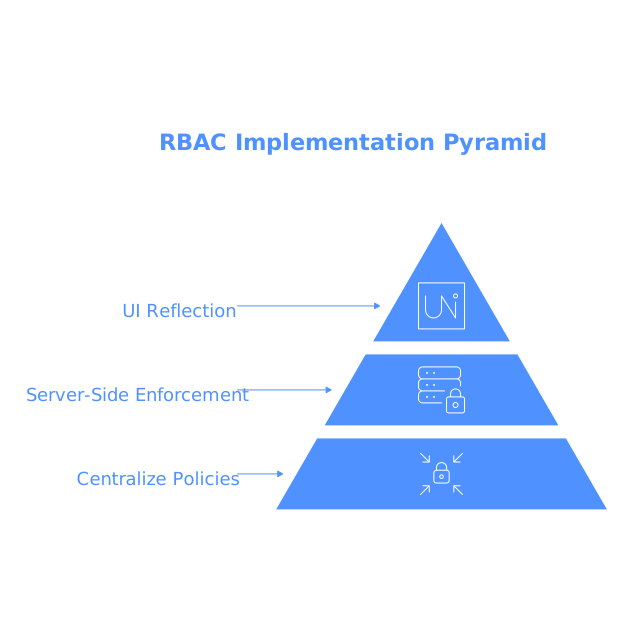
A practical structure is to define:
- Roles (Admin, Manager, Contributor, Viewer)
- Permissions (entity + action), e.g., purchase_orders.approve
- Assignments (user_id + role + scope), e.g., per department
If you expect enterprise requirements, plan for SSO/SAML and SCIM as future enhancements rather than a rewrite. The important part is ensuring your authorization model won’t block that path.
Step 6: Add audit logs that are actually useful
Audit logs aren’t just compliance theater; they are operational tooling. Design them to answer common questions quickly:
- Who created/edited/deleted a record?
- What fields changed?
- When did the change happen?
- What was the source (UI, API, automation)?
At minimum, log: actor, action, entity type, entity id, timestamp, and a compact diff of changed fields. Provide an admin-facing audit log viewer with filters (user, date, entity). Also consider immutability: audit rows should not be editable through the app.
Step 7: One-click deploy without losing engineering control
Internal tools die in “deployment limbo” when the app works locally but nobody owns the infrastructure steps. A one-click deploy path is valuable, but only if it still produces assets your engineering team can audit and maintain.
Look for a deployment workflow that includes:
- Environment separation (dev/staging/prod) or at least configurable environments
- Managed database and auth integration
- Simple secrets management
- Rollback strategy (even if basic)
- GitHub sync/export so changes can be reviewed via pull requests
When deployment is straightforward, teams can spend their time on correctness (permissions, auditability, data quality) rather than plumbing.
Step 8: Validate the MVP with a security and ops checklist
Before you roll out to a broader internal audience, run a short checklist:
- RBAC: Can a Viewer access admin endpoints? Try it intentionally.
- Audit logs: Do key actions produce entries? Can you trace a problematic change?
- Data access: Are sensitive fields protected (salary, PII, credentials)?
- Backups: Is there a database backup plan?
- Onboarding: How does a new user get access and the correct role?
This is also the moment to document “what’s in scope” for the MVP. Teams move faster when they know what is intentionally not included yet.